
Add music to your 360 photobooth videos
A soundtrack plays under every clip from your event. You can pick one track, or pick several and let each clip get a different one at random.
A soundtrack plays under every clip your booth makes. It is the one piece of
branding a guest hears rather than sees, and it does more than the others to
set the feel of a video.
Music works differently from the intro, overlay and outro. Those come from
your phone each time. Music comes from your Music library, which lives
in your account, so you upload a song once and reuse it on every event you
ever run.
Add a soundtrack to an event
- Open the app and tap Projects.
- Tap the event.
- Tap the Branding tab.
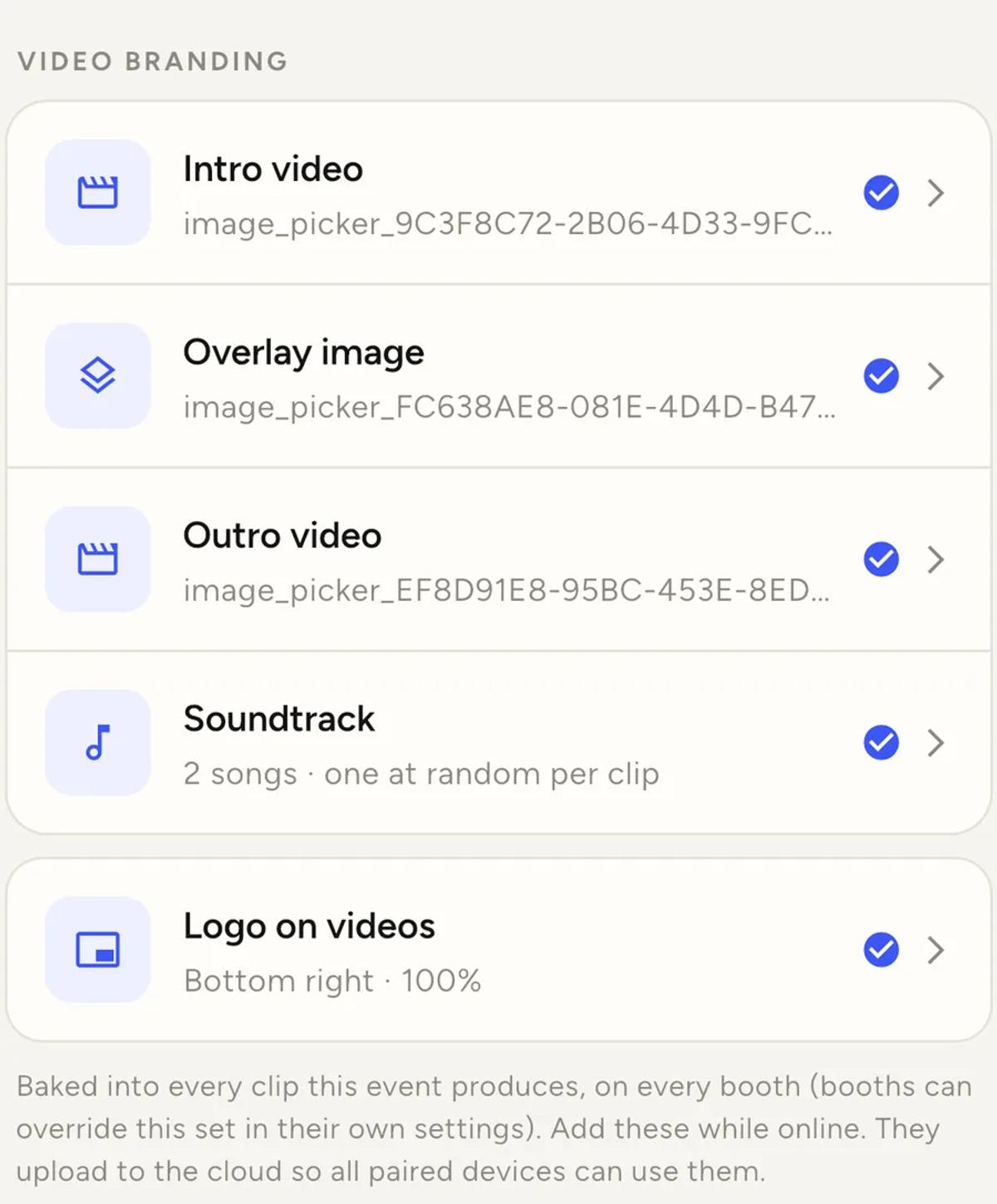
- Under VIDEO BRANDING, tap Soundtrack.
- Tick the track or tracks you want, then tap Save.
Each row has a play button, so you can listen before you choose.
One track, or several
This is the part most operators miss.
Tick one track and it plays on every clip of the event.
Tick several and each clip gets one of them at random. The row then
reads something like "2 songs, one at random per clip".
Several tracks is usually the better choice for a long event. If a hundred
guests all post a clip from the same night with the same song under it, the
videos start to look like copies of each other. A handful of tracks keeps
them feeling individual.
To clear it again, open the sheet and tap No soundtrack.
Your Music library
The library is at Profile, then Music library. Two things about it
are worth knowing before you upload anything.
You clip the song at upload. You choose the section you want when you
add it, not every time you use it. So upload the chorus, or the part that
lands well under a ten second clip, and it is ready for every future event.
One track is the default. New events start with whatever you have set as
the default, so if you mostly use one song, set it once and stop thinking
about it.
You can also upload straight from the soundtrack sheet on an event. Tap
Upload a song and it goes into your library at the same time, so it is
there next time.
Deleting a track does not break past events
If you delete a song from your library, events already using it keep playing
it. Deleting only removes it from the library, so you cannot pick it for new
events.
You will see those tracks marked in the picker on the events that still use
them, so nothing disappears without explanation.
Make sure you are licensed
The app says this on the library screen and it is worth repeating here.
Social platforms run automated copyright matching. A clip with a commercial
track under it can be muted or blocked when a guest posts it, and that is
outside anything the app controls. The guest gets a silent video and blames
the booth.
Plenty of operators use licensed or royalty free music for exactly this
reason. It is worth deciding before an event rather than after.
It works on every plan
A soundtrack is not a Pro feature. Neither is an intro or an outro.
Pro changes one thing only, which is whose brand is on the clips. On a free
account clips carry the Logibooth watermark instead of your overlay artwork
and logo. Your music still plays.
If your music does not play
- Check the row. If it reads "Not set", nothing was saved. Tick a track
and tap Save. - Check the booth. A booth can override the event's soundtrack in its
own settings. - Check when you added it. Clips that have already finished processing
keep the branding they were made with. Clips still in the queue will pick
up the soundtrack you just added. - Check the guest is not muted. Phones play video silently by default in
most feeds. That is the platform, not the clip.
Keep reading
Add an overlay to your 360 photobooth videos
An overlay puts artwork on top of every clip your booth makes. Start from a template and edit it in the app, or upload a file of your own. Here is how, and why an overlay sometimes does not appear.
Read more →
Brand kit, event identity and booth overrides
Branding sits at three levels and they do not all behave the same way. Two follow your changes, one is copied once and never looks back.
Read more →
Build your own effect
Chain your own sequence of plays, freezes and rewinds against the ten-second take. Here is how the builder thinks, and the one rule that makes boomerangs work.
Read more →