
How to make a photo booth overlay that actually fits
Most operators can start from a template in the app, drawn at the right shape already. If you design your own, get the shape wrong and the artwork is stretched across every clip. Here is how to do both.
An overlay is the artwork that sits on top of every clip: the couple's names,
the company logo, the event title, the border. It is the single thing that
makes a clip look like yours rather than like any other booth's.
It is also the easiest thing to get subtly wrong in a way you do not notice
until the event is over.
The short answer: start from a template if you can, and if you design your
own, make the artwork match the booth's shape, not the other way round. If
the shape and your artwork disagree, the artwork loses, and it loses on every
clip of the night.
Do you need to design an overlay at all?
Often not. Logibooth has a library of overlay templates, grouped by occasion.
You pick one on the event's Branding tab, change the text, font, size, colour,
style and effects in the editor, and save it. The preview is the finished
overlay, so what you see is what goes on the clips.
A template comes drawn in both shapes, portrait and landscape, and is rendered
at the shape you are setting it for. So the stretching problem the rest of this
article is about does not happen to a template. The
overlay tutorial
walks through it screen by screen, and
choosing a 360 photo booth overlay template
covers what to write on one so the words survive being posted.
Either way, an overlay only appears on clips with Logibooth Pro. On the free
plan, clips carry the Logibooth sample watermark instead.
The rest of this article is for when you want artwork of your own: a client's
exact brand, a sponsor's files, or a design you have made before. That is where
the shape decides everything.
Which clip shape should you design for?
Before you open a design tool, check what shape the booth is set to. It is
Clip shape in Booth Settings, and it will read one of two things:
Portrait 9:16 (1080 x 1920) or Landscape 16:9 (1920 x 1080)
That label carries the pixel size on purpose. It is the number you paste into
your canvas, and it is the whole reason to look before you design rather than
after.
The shape is set per booth. A two booth event can genuinely run one of each,
which means two pieces of artwork, not one.
Portrait or landscape covers how
to decide which.
What happens if the shape and the artwork disagree?
Worth knowing exactly, because it is not what most people assume.
The artwork is stretched to fill the frame. It is not cropped, and it is
not letterboxed with bars. A 1080 x 1920 overlay on a landscape clip gets
squashed horizontally into 1920 x 1080: circles become ovals, text gets fat,
and a border that was even is suddenly thick on two sides and thin on the other
two.
Nothing warns you when you pick the file. The app takes whatever you give
it. The only related warning is on the recorder, and it is about something
else: it tells you when the phone is mounted against the booth's setting, not
when your artwork is.
So the check has to be yours, before the event.
Why should the middle be left empty?
The rule that matters most, and it applies to both shapes.
Guests appear in the middle of the frame. Anything you put there covers them,
and covering the people is the one thing an overlay must never do. Put the
artwork near the edges and leave the centre clear.
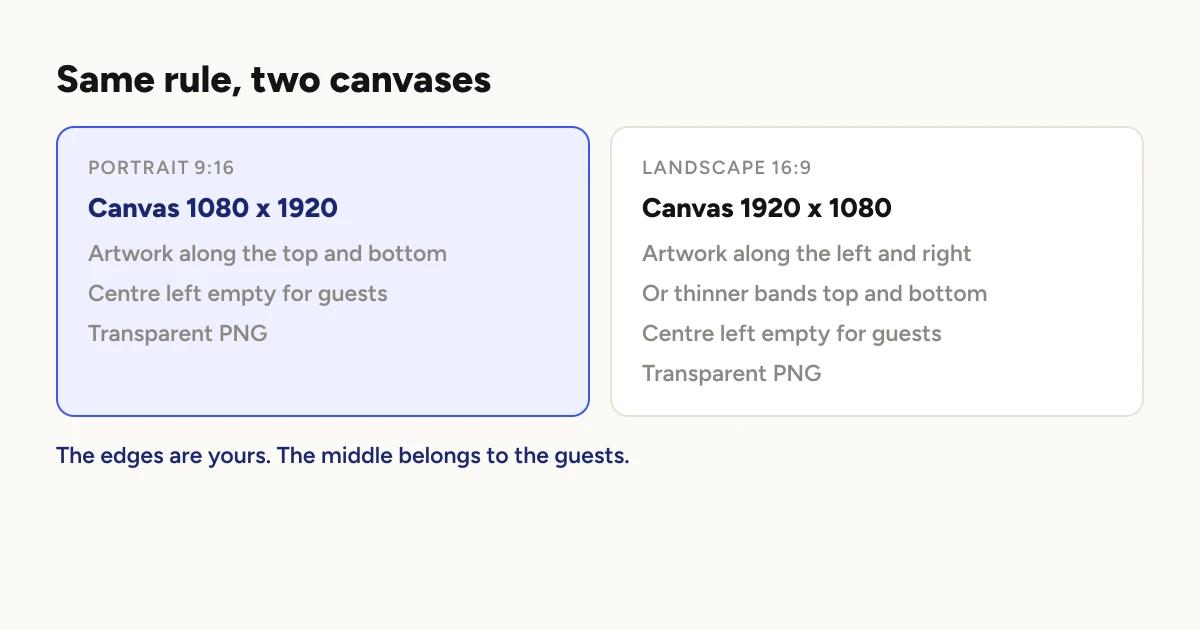
In portrait that usually means a band across the top and another across the
bottom. In landscape the tall edges are shorter, so the same amount of artwork
sits better on the left and right, or as thinner bands top and bottom.
This is the reason a landscape overlay is not simply a rotated portrait one.
The empty area has a different shape, so the design has to be redrawn rather
than turned.
What file does the overlay need to be?
A PNG with a transparent background. A JPG has no transparency, so it will
cover the whole clip in a solid rectangle.
Exactly the pixel size on the label. Not "about right", not a bigger
version to be safe. The size on the label.
Check it on a dark background before you export. Transparent areas look
white in most design tools, which makes it easy to leave a white box behind
your artwork without noticing.
Adding an overlay
covers getting the finished file onto the booth.
What about the intro and outro?
They are made against the same shape as the overlay and have the same problem.
An intro exported for portrait on a landscape booth will not sit right.
Same rule: check the booth's Clip shape, then export to match.
What if you are running both shapes?
With a template, you do not have to do anything: it already comes in both
shapes.
With your own artwork, make both versions. There is no setting that converts
one file into the other.
The practical approach: design the portrait one first, since that is the shape
most events use, then rebuild the landscape one from the same elements rather
than scaling the finished file. That is the difference between a clip that
looks made for the event and one that looks squashed.
Before the event
Check Clip shape on the booth, not just the project, if that booth differs
from the default.
Export at exactly the size on the label.
Transparent PNG, checked on a dark background.
Middle clear, artwork at the edges.
Do one test take and watch it back on a phone. With your own artwork, this
is the only step that catches a stretched overlay, because nothing in the app
will tell you when you pick the file. It costs one take and protects an entire
event's clips.
Keep reading
How many clips does a 360 booth event produce?
A rough guide from Logibooth's own numbers. A typical event records a few dozen clips, and the busiest run into the hundreds. Here is what moves it.
Read more →
Choosing a 360 photo booth overlay template
Picking a template is quick. Picking one whose words still read on a spinning clip, and still show once a guest posts it, takes a little more thought. Here is what to look for.
Read more →
Running a 360 booth outdoors
Every indoor problem is about too little light. Outdoors the problem flips. The sun is one enormous light you cannot move, and part of every spin points straight at it.
Read more →