
Why a 360 clip failed, and what you can actually do
Failed usually means the last attempt errored, not that the video is gone. The recording is often still sitting on the phone. Here is how to tell, and what recovers it.

Search for help with a 360 booth clip that will not process and you mostly get
results about Apple's Mac Photo Booth app, which is a different product
entirely. So here is the operator version.
The short answer: failed almost never means the video is gone. It means the
last attempt at something errored. The recording usually sits on the phone,
intact, waiting for another go.
Knowing which state a clip is in tells you whether to act, wait, or stop
worrying.
What do the clip states mean?
A clip moves through these in order, and only the last two need you.
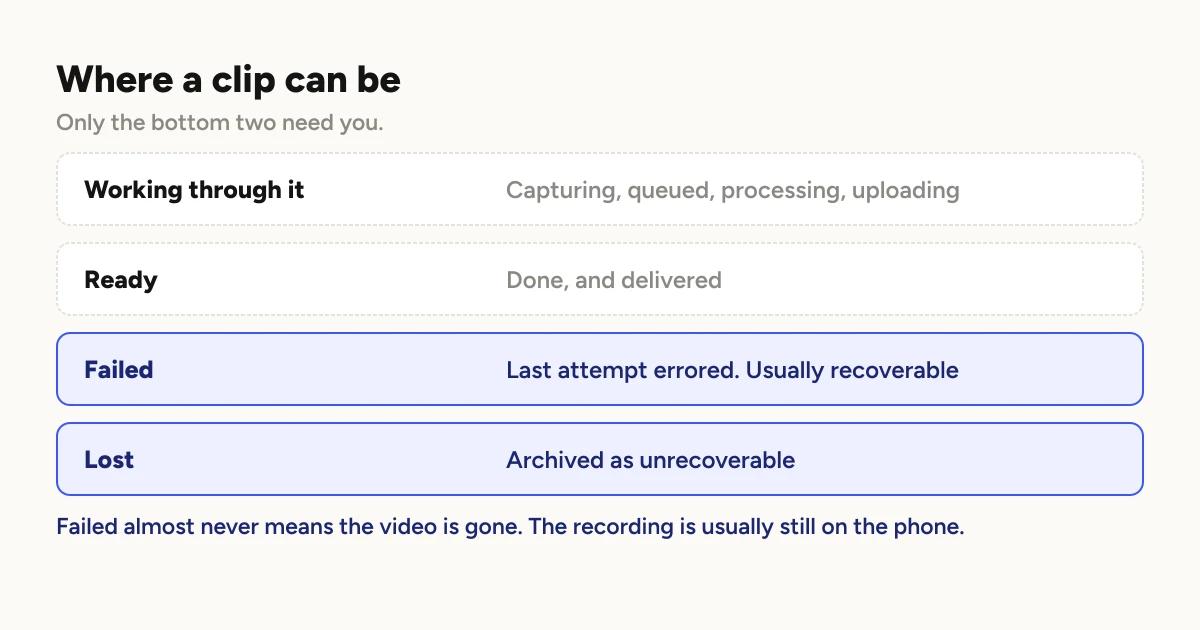
Capturing, queued, processing, uploading. All normal. The clip is moving.
Two render at once, so a queue on a busy night is expected rather than a
problem.
Ready. Done, uploaded, thumbnail made.
Failed. The last attempt errored. This is recoverable and usually the
recording is fine.
Lost. Archived as unrecoverable. This is the one that means what it sounds
like, and in most cases an operator set it deliberately.
What is the single most useful thing you can do?
Close the app fully and reopen it.
That is not folk advice. On each launch the app takes one pass at clips left in
failed and retries them, up to twenty five of them, once per session. If a
clip failed for a reason that has since gone away, that pass fixes it without
you touching anything.
The reason this exists is worth knowing, because it tells you what kind of
failure it catches. A server-side bug once rejected a filename format, so no
iOS clip could upload at all. Every clip of an event went to failed while the
recordings sat perfectly good on disk, and fixing the server did not un-stick a
single one of them, because nothing was looking at those clips any more.
A relaunch is the cheapest signal that something material might have changed:
a new build, a fixed server, a different network. So it gets one pass. A clip
that fails again goes straight back to failed, which is the point. It surfaces
real problems instead of hiding them behind endless retries.
Mid-event, weigh it. Restarting is quick, but it stops the queue while the
app relaunches. If you are mid-rush and the clips are only failing to upload,
they will still be there in twenty minutes. If everything is failing, restart
now.
Why does retry only work on the device that recorded it?
This is the fact that surprises people most.
The retry is not a cloud operation. It re-runs the work from the original
recording, which lives on the phone that captured it. So the phone that
recorded the clip is the only device that can retry it.
If you tap retry and nothing happens, the app now tells you which of these it
is rather than failing silently:
Not the owning device. You are looking at the event from a second phone or
an iPad. Go to the recording device.
The file is missing. The original recording is no longer on this device.
That is the one case where retry genuinely cannot help, and it is almost always
because storage was cleared.
What is the difference between failed and lost?
Different things, and worth not confusing.
Failed is a state the app puts a clip in. It means try again.
Lost is usually a decision you made. It is how you tell the app to stop
counting a clip that is never coming back, so your queue reflects reality
instead of showing a permanent backlog of things you have given up on.
Marking a clip lost does not delete anything that was recoverable. It is
bookkeeping. But it is also not undoable in the sense that it will not resume
on its own, so only do it once you have tried the recording device.
Is a clip ever genuinely unrecoverable?
If a booth was set to Local delivery, its clips are not uploaded
automatically. They are rendered, served to guests over your network, and
marked finished, with no cloud copy at all.
Until you run the upload yourself, the recording device holds the only copy.
Clear storage before that upload and the clips are gone. Not failed, not lost.
Gone.
This is the failure mode with no recovery path, which is why it deserves more
care than anything else on this page.
Running a booth with no wifi covers
the whole Local delivery picture, and
freeing up space
covers which files are safe to clear.
A short order of operations
- Check the state. Failed is recoverable. Lost is not.
- Are you on the device that recorded it? If not, go there first.
- Close the app fully and reopen. One automatic pass at everything failed.
- Retry by hand if the automatic pass did not take.
- Read the reason if retry declines. It will tell you whether it is the
wrong device or a missing file. - Mark as lost only once you have done the above from the right phone.
What actually prevents most of this
Almost every failure that ruins an event traces back to one of three things,
and all three are decided beforehand.
Storage. The most common cause of an unrecoverable loss.
Delivery mode. Local means you own the backup step.
One launch online before you leave. The app checks your plan when it bakes
branding. On a device that has never been online it waits, and it waits while
holding one of the two slots that render clips.
Why your queue backs up covers that
last one, and why a slow venue connection looks exactly like a slow phone.
Keep reading

How many clips does a 360 booth event produce?
A rough guide from Logibooth's own numbers. A typical event records a few dozen clips, and the busiest run into the hundreds. Here is what moves it.
Read more →
Choosing a 360 photo booth overlay template
Picking a template is quick. Picking one whose words still read on a spinning clip, and still show once a guest posts it, takes a little more thought. Here is what to look for.
Read more →
Running a 360 booth outdoors
Every indoor problem is about too little light. Outdoors the problem flips. The sun is one enormous light you cannot move, and part of every spin points straight at it.
Read more →