
Choosing a 360 photo booth overlay template
Picking a template is quick. Picking one whose words still read on a spinning clip, and still show once a guest posts it, takes a little more thought. Here is what to look for.
Most operators no longer design an overlay from scratch. Logibooth has a
library of overlay templates, grouped by occasion, and you pick one, change the
words and save it. The
overlay tutorial
walks through the screens.
That makes the design part easy and moves the skill somewhere else. The
question is no longer how to build an overlay. It is which template to choose,
and what to write on it, so that the words still read on a clip that spins, and
still show once a guest posts it.
If you want artwork of your own instead,
making an overlay that fits
covers the shapes and the file.
What should the overlay actually say?
Less than you think.
A 360 clip is short, the camera is moving, and the guest is watching
themselves, not your text. Nobody reads a sentence on it. What survives is a
few big words that can be taken in at a glance.
For most events that means two things at most. A name and a date. The
couple's names and the wedding date. The birthday person and the age. The
company and the event. Anything past that is competing with the guests for
attention, and losing.
The editor enforces some of this for you. Your words sit in a band along the
bottom of the frame, and the band only holds what fits. Add more lines than
it can take at the size you have chosen and the extra lines disappear from the
preview. Type a line that is too long and it shrinks, and past a point it is
cut off with an ellipsis, so a long line of names can end in "…". Both show up
in the preview before you save, so check it rather than trusting what you
typed.
Why does text disappear on a 360 clip?
Because the background behind it keeps changing.
On a still photo you choose a text colour against one background. On a 360
clip the camera travels around the guests, so the same words pass over a dark
suit, then a white dress, then a bright venue light, all within a few seconds.
Text that reads perfectly on the preview can vanish for part of the spin.
That is exactly what the Effects control is for. It offers None,
Outline, Shadow and Pill, and the reason those options exist is
legibility over moving video. An outline or a shadow gives the letters an edge
that survives a pale background. A pill puts the words on their own solid
shape, which is the safest choice when the background is unpredictable.
Colour matters too, but it cannot do the job on its own. No single colour
reads well over both a black suit and a white dress. An effect is what makes it
reliable.
Where do the words end up once a guest posts the clip?
This is the part almost nobody checks, and it is worth understanding.
Whatever template you pick, your words never go in the middle of the frame.
That space belongs to the guests. The words sit in a band along the bottom.
The bottom of a vertical video is also where the social apps draw their own
things. When a guest posts the clip as a Reel or a TikTok, the app puts their
name and caption along the bottom, and a column of buttons down the right-hand
side. Exactly where varies between apps and changes over time, but the bottom
of the frame is contested space.
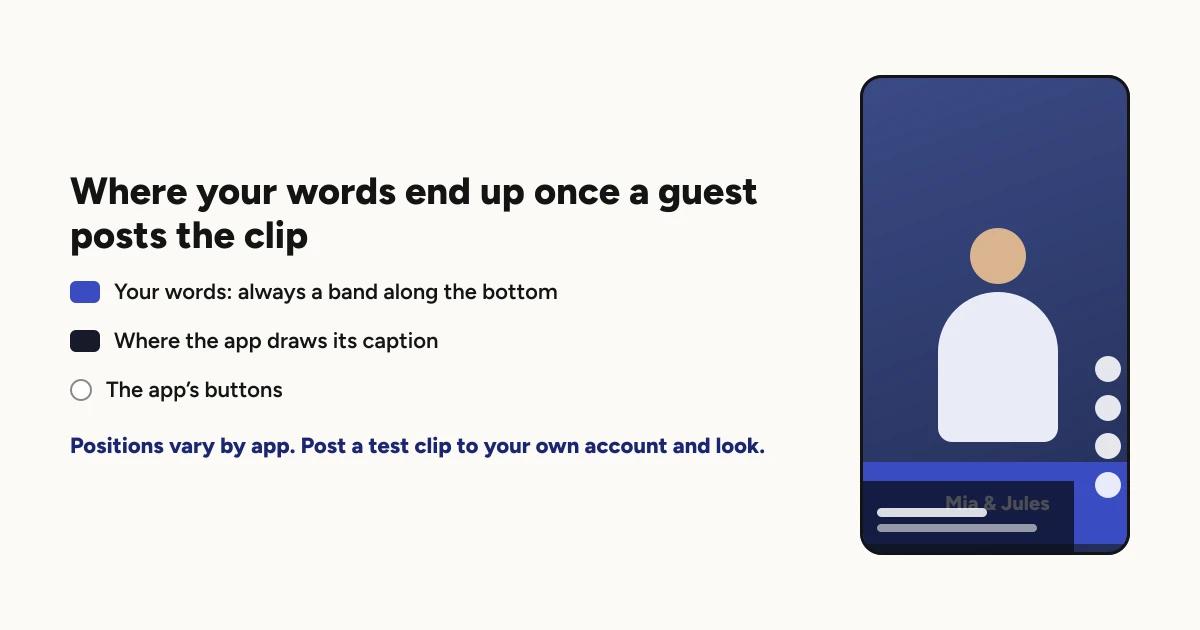
You cannot move the band, so the useful response is the same three things
from above: fewer words, bigger letters, and an effect so whatever stays
visible is readable. Then check it for real, which takes a minute.
Post a test clip to your own account as a Reel, look at it the way a guest's
friends will, and see what the app covers. Delete it afterwards. It is the only
check that shows you what the people you are actually trying to reach will see.
How do you match a template to the event?
Start with the occasion, then the room, then the client.
The occasion. The library is grouped by occasion, which gets you most of the
way. A template made for a wedding will look like one.
The room. The overlay sits on top of the venue for the whole clip. Soft,
light artwork can wash out in a bright space, and dark artwork can disappear in
a dim one. If you know the venue, pick for it.
The client. At a wedding the overlay is part of the keepsake, so it should
suit the couple. At a corporate event it carries the client's brand, and
running a booth at a corporate event
covers why that changes what you choose.
Then use the rest of the editor to make it theirs. Font, Size and
Colour change how the words look, and Style handles alignment (Left,
Centre or Right), capitals (As typed or ALL CAPS) and letter spacing (Tight to
Wide).
Does a template work in portrait and landscape?
Yes. A template comes drawn in both shapes and is rendered at the shape of the
booth you are setting it for, so you do not rebuild it for a landscape booth
and it will not come out stretched.
The one thing to keep in mind is that posting is mostly a portrait habit. If
your guests will share the clips, the bottom band advice above matters most for
portrait booths.
Portrait or landscape covers how
to choose between them.
Can you reuse a style for the next event?
Yes, and it saves more time than it sounds.
Any style you save collects under Your styles in the template list. For an operator who has a look they like, or a venue that books you
repeatedly, the next event is a matter of changing the names and the date.
Does the overlay need Pro?
To appear on your clips, yes. You can browse the templates and try them in the
editor on any plan. On the free plan the clips carry the Logibooth sample
watermark instead of your overlay, whichever template you choose. That is the
one thing Pro changes: whose brand is on the clips.
Before the event
A name and a date, not a sentence.
Pick an effect. Outline, Shadow or Pill, so the words survive a white dress
and a bright light.
Read the preview. Missing lines and cut-off words show up there before you
save.
Record a test take and watch the whole spin, not just the first second.
Post one to your own account and look at what the app covers.
Keep reading
How many clips does a 360 booth event produce?
A rough guide from Logibooth's own numbers. A typical event records a few dozen clips, and the busiest run into the hundreds. Here is what moves it.
Read more →
Running a 360 booth outdoors
Every indoor problem is about too little light. Outdoors the problem flips. The sun is one enormous light you cannot move, and part of every spin points straight at it.
Read more →
A 360 booth at a school formal or prom
Some of the guests are minors, which changes who your client is, which guest requests belong at the booth, and what the school needs to know about where the clips go.
Read more →