
Portrait or landscape, and why your booth has to decide
Clip shape is the one capture setting you have to get right before the event, not during it. Here is why the booth asks instead of guessing, and when landscape is actually the right answer.
Almost everything about a 360 booth can be adjusted on the night. The effect,
the music, how hard you ask for a follow, whether clips go to the cloud or over
your own network. Change your mind at 9pm and the next take picks it up.
Clip shape is not like that, and it is worth understanding why before you set
it.
The short answer: the booth asks you to declare the shape rather than
working it out from how the phone is sitting, because your intro, outro and
overlay were designed days earlier against a fixed size. The artwork cannot
be re-cut at the venue.
Does the app detect the shape, or do you choose it?
A phone knows which way up it is. It would be easy for the app to look at the
mount and render to match.
That would be wrong more often than it was right. A phone can be knocked, a
mount can be adjusted mid-event, and an operator can pick the rig up to check
something. If the shape followed the sensor, one nudge would produce a clip
that does not match the twenty before it, and you would not find out until you
sat down to deliver them.
So the shape is a setting. It sits as Clip shape in Booth Settings, and it
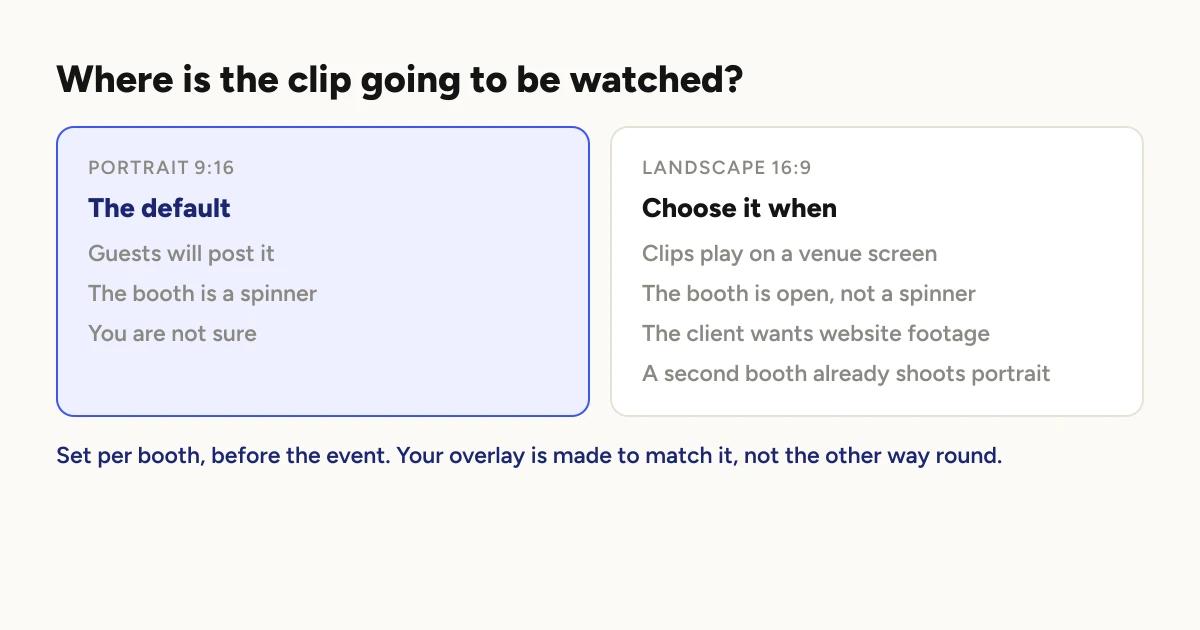
carries the exact size with it: Portrait 9:16 (1080x1920) or Landscape
16:9 (1920x1080). The pixel spec is in the label deliberately, because that
is the number you need when you open a design tool, not the word "portrait".
The phone's actual orientation is still used, but for a different job. If the
booth is set to landscape and the phone is mounted portrait, the recorder shows
a banner: This booth is set to landscape. Rotate the phone, or change Clip
shape in Booth Settings. Your intro, outro and overlay were made for
landscape. It does not block you, because it might be deliberate. It just
makes sure you know before the queue forms.
When is landscape actually right?
Portrait wins by default, and the reason is not aesthetic. It is where the clip
is going: a guest posts it to a feed that is a phone held upright, and a 16:9
clip in a 9:16 feed is a small strip with grey above and below.
Landscape earns its place when the clip is not going to a phone feed.
A screen at the venue. Anything playing on a TV or a projector wants 16:9,
and a portrait clip on that screen wastes most of it.
An open booth rather than a spinner. A wider frame suits a group standing
side by side better than a tall one.
Footage the client asked for. A couple who want the night on their website,
or a brand who want it for a landing page, are asking for 16:9 whether they use
that word or not.
A mixed event. The setting is per booth, so a two booth event can genuinely
run one of each. The spinner shoots portrait for guests to post; the open booth
shoots landscape for the screen by the bar. It is one project.
What does the setting actually change?
It resolves once when a clip is baked, and everything downstream gets the same
answer. That matters more than it sounds, because it means the parts cannot
disagree with each other.
The render size. The clip comes out at the declared size.
The watermark, on the free plan. It ships in a landscape cut as well as a
portrait one, so a free landscape clip is not carrying artwork stretched out of
shape.
Your logo. Composited against the same dimensions the clip is rendered at.
Effect previews. They render at the booth's shape, so what you preview is
the shape you get.
What has not caught up yet?
Being straight about this, because it is the part you would otherwise discover
at an event.
Landscape recording shipped in August 2026. The guest-facing surfaces are
still laid out for portrait. Guest galleries, the client download panel and
the Share Station all assume a tall tile, so a landscape clip plays correctly
but sits in a shape that was built for a portrait one. The clip itself is fine.
The furniture around it has not been rebuilt.
The promo reel is still portrait. If you build a reel from a landscape
booth's clips today, it is fitted into a portrait frame and loses a lot of the
width. If reels matter to you, keep that booth portrait for now.
None of this affects what a guest downloads. It affects how it looks in the
gallery on the way there.
Why does the overlay have to be decided first?
This is the real reason clip shape is a before-the-event decision.
An overlay made for 9:16 does not fit a 16:9 render. Neither does an intro
or an outro. They were exported at a fixed size days ago, and the shape of the
clip is what they were measured against.
If your artwork and your booth disagree, the artwork is the thing that gives.
So the order to do this in is: set the shape first, then make the artwork to
match. Not the other way around.
If you are running both shapes at one event, you need both versions of the
artwork. There is no way around that, and it is worth knowing a week out rather
than the morning of.
Adding an overlay
covers the mechanics once you have the file.
Before the event
Set Clip shape on the booth, not just the project, if that booth differs.
It inherits the project default and can be cleared back to it, the same way
Guest delivery works.
Check the label, not the word. It carries the size. That is what you paste
into your design tool.
Make the artwork to match, and if you are running two shapes, make two.
Do one full test take and watch it back on a phone. The recorder banner
tells you if the mount and the setting disagree, but only a finished clip tells
you the artwork fits.
Leave it alone once guests arrive. Changing shape mid-event gives you an
evening of clips in two different shapes and artwork that fits one of them.
If you want the wider picture of what happens between the arm stopping and the
video appearing, how a 360 photo booth works
covers the whole path.
Keep reading
How many clips does a 360 booth event produce?
A rough guide from Logibooth's own numbers. A typical event records a few dozen clips, and the busiest run into the hundreds. Here is what moves it.
Read more →
Choosing a 360 photo booth overlay template
Picking a template is quick. Picking one whose words still read on a spinning clip, and still show once a guest posts it, takes a little more thought. Here is what to look for.
Read more →
Running a 360 booth outdoors
Every indoor problem is about too little light. Outdoors the problem flips. The sun is one enormous light you cannot move, and part of every spin points straight at it.
Read more →