
Why your 360 clips flicker, and the setting that fixes it
Dark bands rolling through a clip are not a broken phone or a cheap venue. Mains power cycles, venue lights cycle with it, and the camera has to be told which cycle it is working against.

You play back a clip and there are dark bands rolling through it. The guest
looks fine, the room looked fine, and the footage pulses like something is
wrong with the phone.
Nothing is wrong with the phone. This is one of the few problems in this job
with a single cause and a single fix, and it takes about ten seconds to correct
once you know what you are looking at.
What does 360 booth flicker look like?
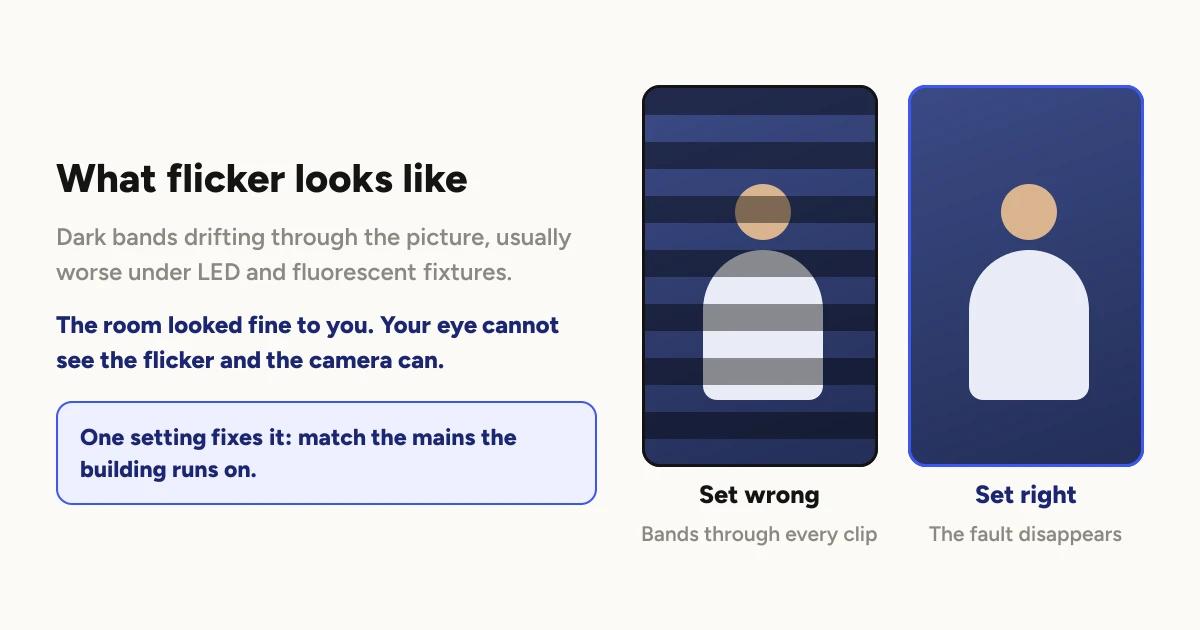
Bands of darker and lighter light moving through the frame, usually
horizontally. Sometimes it reads as a flicker across the whole picture instead
of bands. It is worse under LED and fluorescent fixtures than under daylight,
and it often shows up in a clip after looking perfectly fine to your eye in the
room.
That last part is the giveaway. Your eye cannot see it and the camera can.
If the room looked normal and the clip does not, this is almost certainly what
you are looking at.
Why does it happen?
Mains electricity does not deliver a steady stream of power. It cycles, many
times a second, and a lot of lighting cycles with it. Those lights are actually
getting brighter and dimmer continuously. You never notice because the cycle is
far faster than your eye can follow.
A camera is not a continuous observer. It takes a sequence of separate images.
If the rhythm of those images does not line up with the rhythm of the light,
each image catches the light at a slightly different point in its cycle. One is
caught near the top, the next slightly lower, the next lower again. Played
back, that difference becomes bands moving through the picture.
Line the two rhythms up and the problem disappears completely, because every
image now catches the light at the same point in its cycle.
That is the entire fix. The camera has to know the rhythm of the mains power in
the building.
Why does a 360 booth show it more than most cameras?
Two reasons, and they are both consequences of what the booth is for.
Slow motion samples the light more often. Recording for slow motion means
capturing many more images every second, which means many more opportunities to
catch the light at a different point in its cycle. The same room that produces
clean footage at normal speed can produce visible banding once you are ramping.
The camera is moving. On a static camera, banding sits still and reads as a
texture. On an arm travelling around a guest, it moves against a moving frame,
which is far more noticeable to a viewer.
So the clips most likely to show it are the dramatic slow ones. Which is to
say, the ones you post.
The fix
The booth has a setting called Flicker correction, and it has two options:
50 Hz mains and 60 Hz mains. Setting it to match the building is the
whole solution.
Open the event, then Booths, then the booth, then Settings. The
Flicker correction row shows the current setting as 50 Hz or 60 Hz.
It is set per booth, and a booth takes the event's setting unless you give it
its own. That matters at a two booth event only if you have somehow put them on
different supplies, which you almost certainly have not.
Which one should you choose?
This is the part people overthink. It is a property of the country you are
working in, not the venue. You are not guessing per event. You set it once
for where you work and it stays right.
Australia, the United Kingdom and most of Europe, Asia and Africa run at
50 Hz. The United States, Canada and much of South America run at 60 Hz. If
you are ever unsure, it is printed on the label of almost any power adapter or
appliance in the building.
One thing worth knowing if you are in North America. The setting defaults
to 50 Hz. If you are working on a 60 Hz supply and you have never opened this
setting, it is currently wrong, and that alone may be the reason you have seen
banding. It is a single tap to correct.
What will this setting not fix?
It is worth being clear about the boundary, because flicker gets blamed for
things it did not do.
It does not fix a dark room. Noisy, grainy footage in low light is a
different problem with a different answer, and it is the one covered in
lighting a 360 booth.
It does not fix colour. A room washed in deep blue will still tint your
guests.
It does not fix a light that is genuinely faulty. A failing fixture can
flicker at a rhythm of its own that has nothing to do with the mains cycle. If
one specific light in the room is visibly stuttering to your naked eye, that
light is broken. Move the booth.
Check it during setup, not afterwards
The habit that saves you here is the same one that catches most booth problems.
Record one real test take when you arrive and watch the whole thing back before
guests are in the room.
Banding is obvious in playback and invisible in the room, so a test take is the
only way you will find it in time to do anything about it. Ten seconds of
footage and ten seconds of watching it is the entire cost of never shipping a
night of flickering clips to a client.
Keep reading

How many clips does a 360 booth event produce?
A rough guide from Logibooth's own numbers. A typical event records a few dozen clips, and the busiest run into the hundreds. Here is what moves it.
Read more →
Choosing a 360 photo booth overlay template
Picking a template is quick. Picking one whose words still read on a spinning clip, and still show once a guest posts it, takes a little more thought. Here is what to look for.
Read more →
Running a 360 booth outdoors
Every indoor problem is about too little light. Outdoors the problem flips. The sun is one enormous light you cannot move, and part of every spin points straight at it.
Read more →