
Choosing the phone that runs your 360 booth
The phone is the camera, and it is also the editor and the storage. Those three jobs want different things, and most buying advice only considers the first one.
Every honest guide to buying a 360 booth says the same thing at some point: the
phone is the camera, not the platform. The arm spins, the phone films. Whatever
you spent on the rig, the footage came out of the handset.
That is true, and on its own it is not very useful. It tells you the phone
matters without telling you what to look for. So here is the next step.
The phone is doing three jobs, not one
This is the thing that makes a booth phone different from a camera. During your
event, the same device is doing three separate jobs, and they are competing
with each other for the same hardware.
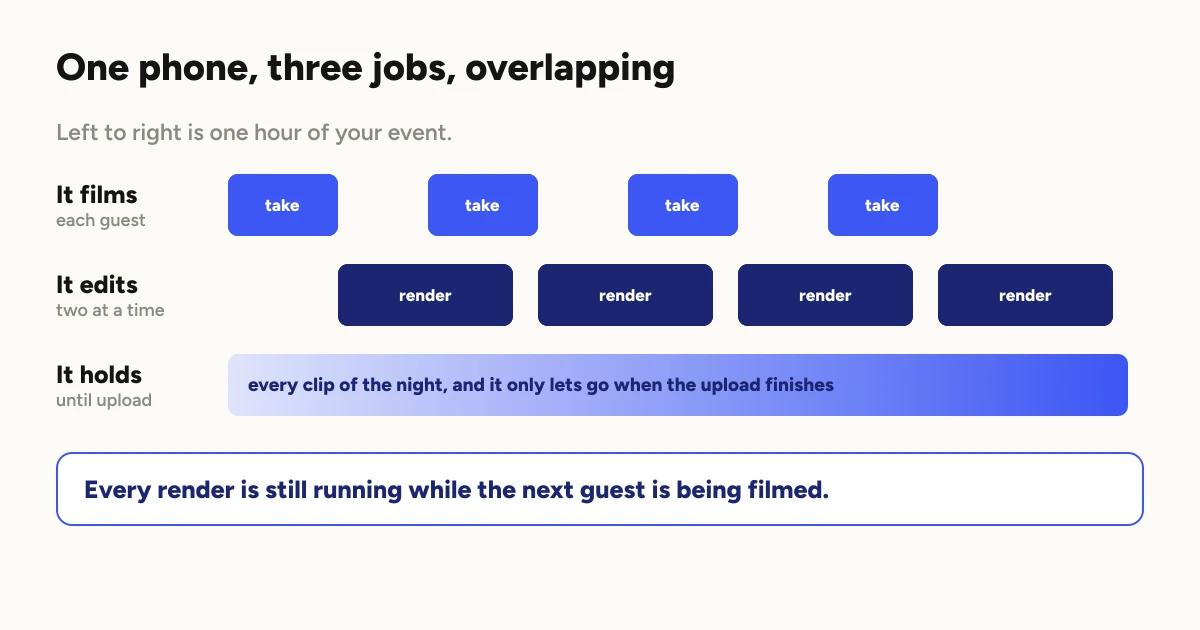
It films. The obvious one. Every clip comes from this camera.
It edits. Rendering happens on the phone, during the event, while the next
guest is already standing on the platform.
Two clips render at a time, and that
is a real video editing workload running in the background of the thing you are
also filming with.
It holds everything. Every clip lives on the phone until it uploads.
On a night with no usable wifi, that can mean the entire event.
Most advice about booth phones only considers the first job. The second and
third are where operators actually get caught out.
Do you need a dedicated phone?
Not a specification, a habit, and it is the single highest value decision in
this article.
Interruptions. A phone that is somebody's daily driver takes calls, throws
up notifications, and gets picked up to check something. Any of those in the
middle of a take costs you a clip and the guest's turn.
Storage. Your personal phone is already half full of your own life. A booth
phone starts empty and stays that way.
It stops being a decision. The booth phone is charged, cleared and ready
because that is the only thing it does. There is no morning where you are
deciding whether tonight is worth swapping the SIM.
A dedicated phone does not have to be new, and this is where operators save
real money. A previous generation handset that only runs the booth will
outperform a newer phone that is also running your life.
What actually matters when you pick one?
Roughly in the order that shows up in the footage.
Low light performance. The most important thing by a distance. Venues are
dark, and slow motion needs more light than normal speed does, so the camera is
working with less than you think. This is where the visible difference between
a good clip and a muddy one lives. It is also the reason
lighting is worth more than a phone upgrade:
you can add light, but you cannot add sensor.
Stabilisation. The camera is on a moving arm. Stabilisation is doing more
work in a 360 booth than it does in almost any other use of a phone camera.
Storage capacity. Buy more than you think you need. Clips are large, they
accumulate through the night, and they cannot be cleared until they have
uploaded. There is a whole failure mode here, covered in
running a booth with no wifi, and the
short version is that clearing storage before an upload finishes loses the
clips permanently.
Sustained performance. Not peak speed. A booth phone films and renders
continuously for hours, and phones slow down as they get hot. A handset that
benchmarks well in a ten second test and throttles after twenty minutes is
worse for this job than a slower one that holds steady.
Power. The phone is filming, rendering and uploading all night. It will not
survive a long event on its own battery. Plan to run it on power, and treat the
cable and the adapter as booth equipment rather than an afterthought.
What matters less than the marketing suggests?
Megapixel counts. You are recording video, not stills.
Zoom range. The framing is fixed by the arm. You will never use it.
Being the newest model. The current handset is rarely the meaningful
upgrade over the one before it for this specific workload, and the price gap
is large enough to pay for the lighting that would improve your clips more.
iPhone or Android?
Both run a booth. The honest difference worth knowing: slow motion is
smoother on iPhone than on Android. That is a real gap and it shows up in
exactly the shots people buy a 360 booth for.
If you already own an Android phone that fits everything above, run it. If you
are buying a dedicated phone specifically for the booth and the budget allows
either, that difference is the tiebreaker.
For current supported versions, check the store listing rather than any
article, including this one. Minimum requirements move, and a minimum tells you
what will install anyway, not what will run a booth well for four hours.
Before your next event
Four things, none of which take long.
Charge it and bring the cable. Assume the battery will not be enough.
Clear the storage properly. Which means confirming last event's clips
finished uploading first, not just deleting them.
Turn off interruptions. Do not rely on remembering to do this at the venue.
Record one test take and watch it back. This catches lighting problems,
flicker and framing in the one minute where you can still do something about
them.
The short version
The phone is the camera, and it is also the editor and the filing cabinet.
Choose one that can be all three for four hours without being asked to also be
your phone.
Then spend the money you saved by not buying the newest model on lighting,
because that is what will actually change how your clips look.
Keep reading
How many clips does a 360 booth event produce?
A rough guide from Logibooth's own numbers. A typical event records a few dozen clips, and the busiest run into the hundreds. Here is what moves it.
Read more →
Choosing a 360 photo booth overlay template
Picking a template is quick. Picking one whose words still read on a spinning clip, and still show once a guest posts it, takes a little more thought. Here is what to look for.
Read more →
Running a 360 booth outdoors
Every indoor problem is about too little light. Outdoors the problem flips. The sun is one enormous light you cannot move, and part of every spin points straight at it.
Read more →