
The best 360 photo booth apps in 2026
A comparison of the 360 booth apps worth considering, written by one of them. We say so up front, we cite every price, and we say where we lose.
We make one of the apps on this list. Saying so in the first line is the
only way a page like this is worth reading, so: Logibooth is ours. We think it
suits a particular kind of operator, and we have tried to be exact about who
that is not.
Every figure here was read off each company's own public pages, which are
linked in each section, and re-read on 22 October 2026. Prices in this
category move. Check before you buy.
What actually differs between 360 photo booth apps?
Feature lists here are long and mostly similar. Four things genuinely
separate these apps, and they are the ones you notice at an event.
What the free tier is. A trial that ends, or a free tier that stays.
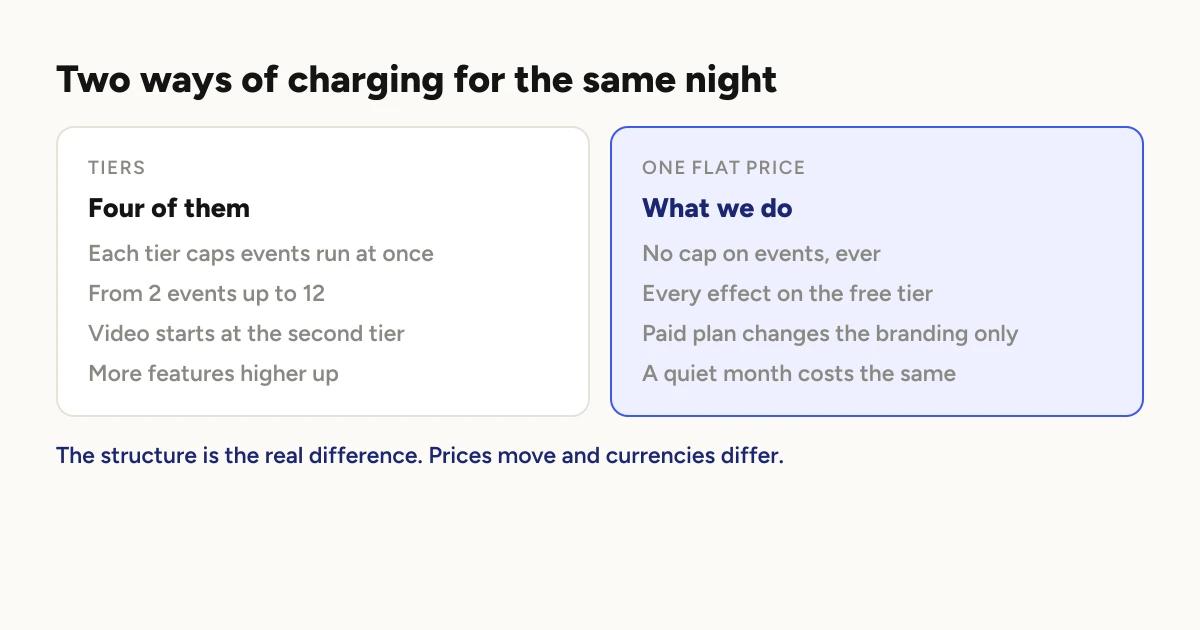
Whether events are capped. Some plans limit how many events you can run at
once. This is the structural difference, it is currency-independent, and it
matters more than any headline price.
What "offline" means. Everyone claims it. The question is whether guests
get their clips at the venue with no connection, or receive them later.
What hardware it runs on. The biggest split in the category, and often the
one that ends the decision.
Logibooth
Ours. Built for a phone on a 360 arm and nothing else.
Price: US$19.99 weekly, US$49.99 monthly, US$499 yearly.
Free tier: free, not a trial. Unlimited events, booths and clips with no
caps. All nine effects with slow motion, intro, outro and music, all three
guest requests with CSV export, Share Station, QR delivery and offline clip
hand-over.
Pro changes exactly one thing: whose brand is on the clips. Free clips
carry our watermark and leave your logo and overlay off. Pro clips carry
yours. That is the whole of it.
Overlays: a template library
you edit in the app, added in September 2026, or artwork you upload yourself.
Offline: the recording phone serves clips to guests over a local network
with no route to the internet at all. Guest contact collection does need a
connection, and we say so rather than blurring the two.
Hardware: iPhone, iPad and Android. No GoPro, DSLR, mirror booths or
desktop.
The trade: nine effects rather than a library of dozens, because most
operators settle on two or three looks and keep them. Landscape recording is
new, added in August 2026, and a booth can now be set to portrait or landscape
individually; what has not caught up yet is the guest-facing side, where
galleries and the promo reel still lay out for portrait. And we are the newest
name here, which is fair to weigh against us. The answer to that is not a
claim: run a full event on the free tier and judge it on your own footage.
Best for: operators running phone based 360 booths who want predictable
cost and do not want to think about venue wifi.
Touchpix
The most established app in the category and the one that runs on the most
hardware. If your setup needs breadth, this is where the decision ends.
Price, yearly (their pricing page):
PhotoPass AU$549.88, MultiPass AU$1,099.99, MultiPass Pro AU$1,759.99,
MultiPass Enterprise AU$2,749.99. Weekly, monthly and half-yearly billing are
also offered. Licences include six months of storage.
Note the currencies differ. Their figures above were shown in Australian
dollars when we checked; ours are US dollars, and their page may show your
local currency instead. Convert before comparing, and do not read the bare
numbers side by side.
The tier detail worth knowing: PhotoPass, the entry tier, has no video
features. Slow motion starts at MultiPass, and surveys start at MultiPass
Pro. So for 360 video the real entry point is AU$1,099.99 a year rather than
the headline AU$549.88.
Events are capped per tier, from 2 active events on PhotoPass up to 12 on
Enterprise.
Hardware (their site): GoPro 7 through 13 and
"Canon, Nikon and Sony DSLR", running on "iOS, Android, macOS, Windows, and
even Raspberry Pi".
Six booth types including mirror and roaming. Nothing else here comes close
to that.
Effects: "60+ built-in Photo and Video Filters and Effects" and "300+
built-in overlays". Many times what we ship.
Offline: they list "internet free sharing" for iOS and Android, and background
removal that runs "offline (no internet needed!)". Their offline capability
is real, and we are not going to pretend we are alone in offering it.
Best for: operators with mixed hardware, more than one booth type, or a
need to change looks often. If you are weighing a move away from it,
Touchpix alternatives covers when leaving
makes sense and when it does not.
Snap360
Phone based like us, with more hardware options than we have.
Price (their site, shown to us in US
dollars): SNAPPHOTO US$24.99 a month, PRO US$31.99 and Diamond Pro US$46.99.
Yearly, marked as a special offer, they are US$239.99, US$299.99 and
US$449.99. A weekly pass lasts seven days and does not renew. SNAPPHOTO is
photos only, so for 360 video the paid entry point is PRO. The same shape as
Touchpix, whose entry tier also has no video.
Free plan: full 360 recording on one device, with QR and link delivery and
no cloud storage, and their page says it "does not expire". It does not state
a watermark policy either way, so we are not going to assume one.
Devices and storage: SNAPPHOTO and PRO run two devices at once with 4 GB of
cloud storage; Diamond Pro runs four with 15 GB. Paid plans list unlimited
events.
Hardware: PRO supports a GoPro and a remote control, SNAPPHOTO supports
Canon cameras, and a Windows version runs photo booths with DNP printing. iOS
15.6 and Android 7 and later.
Offline: recording carries on when the wifi drops, and files upload on
their own later. Listed among PRO's features.
That is store and forward, not delivery at the venue. If a guest at a
basement wedding needs their clip before they leave, that is a meaningful
difference. If you are happy sending clips the next morning, it is not.
Best for: phone based operators who want a GoPro option or photo booths
alongside 360, and whose device count and storage fit a plan.
Snap360 alternatives goes through where the two
of us differ.
Why is ChackTok not compared here?
It comes up in searches for this, and several third-party articles describe it
as free software. Their own site says
otherwise: it is a subscription. It shows bundles that pair a year of the app
with hardware, from $1,400 to $2,599, but no price for the app on its own.
With no like-for-like price there is nothing to compare, and repeating a
third-party summary instead of the source is how a wrong claim ends up on a
page like this. It supports DSLR, GoPro and phone cameras on iOS and Android,
and if it interests you, ask them directly.
Which 360 photo booth apps run on iPad?
All three, but the answer is less useful than it sounds, and it is worth
understanding why before you buy a tablet for this.
On a 360 arm, the thing on the arm is a phone. An iPad is heavy and large,
and an arm spinning one at speed is a different mechanical problem. So when an
app says it runs on iPad, that usually means the iPad is doing another job
rather than being the camera on the arm.
Logibooth runs on iPhone, iPad and Android. The place an iPad genuinely
earns its keep is as a Share Station: a tablet beside the booth that plays the
newest clip with a QR code next to it, so guests collect their video without
handing you their phone.
Touchpix lists iPad and Roaming iPad as booth types in their own right,
separate from 360, and also runs on macOS and Windows. If you want an iPad to
be the booth rather than the screen beside it, that is where to look.
Snap360 runs on iPhone, Android and iPad. Its Windows version is a photo
booth rather than a 360 booth.
What is the best 360 photo booth app for Android?
All three run on Android, so the choice comes down to the same things as on
iPhone: event caps, the free tier and offline delivery. None of them charge
extra for Android.
Snap360 states Android 7 and above, which is a low bar and means older
handsets work. Touchpix runs on Android alongside iOS, macOS, Windows and
Raspberry Pi. Logibooth runs on Android phones, and the Share Station works
on an Android tablet as well as an iPad.
One honest difference worth knowing before you buy a phone for this rather than
after: slow motion is smoother on iPhone than on Android. That gap is real
and it shows up in exactly the shots people book a 360 booth for. It is not a
reason to avoid Android if you already own one that works, and it is worth
weighing if you are buying a dedicated phone anyway.
Is there a genuinely free 360 photo booth app?
Yes, two of the three. Logibooth and Snap360 both have a free tier that does
not expire. Touchpix offers a free trial instead.
What each free tier includes, and which limits hurt at a real event, is in
is there a free 360 photo booth app?
Which one should you choose?
If you shoot with a GoPro or a DSLR, or run mirror booths alongside 360,
hardware support decides this before anything else on the page, and Touchpix
is the answer.
If you change looks constantly and a large effects and overlay library is
part of your offer, that also points at Touchpix.
If you run phone based 360 booths, the questions that will shape your year
are whether events are capped, what the free tier really includes, and whether
guests can get clips at a venue with no connection.
A longer version of those criteria, naming no products at all, is in
what to look for in 360 booth software.
One practical note whichever way you lean. Setup screens tell you nothing
about how software behaves at 11pm with a queue, so test on a real event
before committing. Ours is free to do that on, with no card and no event
limit, so the only thing you risk finding out is whether it suits you.
Every price and quotation above was taken from each company's own public
pages, first read on 21 August 2026 and re-read on 22 October 2026, when our
own capabilities were re-checked too.
Companies change prices and features; confirm on
their site before deciding. Our own figures are on pricing.
Keep reading
How many clips does a 360 booth event produce?
A rough guide from Logibooth's own numbers. A typical event records a few dozen clips, and the busiest run into the hundreds. Here is what moves it.
Read more →
Choosing a 360 photo booth overlay template
Picking a template is quick. Picking one whose words still read on a spinning clip, and still show once a guest posts it, takes a little more thought. Here is what to look for.
Read more →
Running a 360 booth outdoors
Every indoor problem is about too little light. Outdoors the problem flips. The sun is one enormous light you cannot move, and part of every spin points straight at it.
Read more →