
What to look for in 360 booth software
Feature grids compare the wrong things. Nine questions that actually decide how your night goes, and what a good answer to each one sounds like.
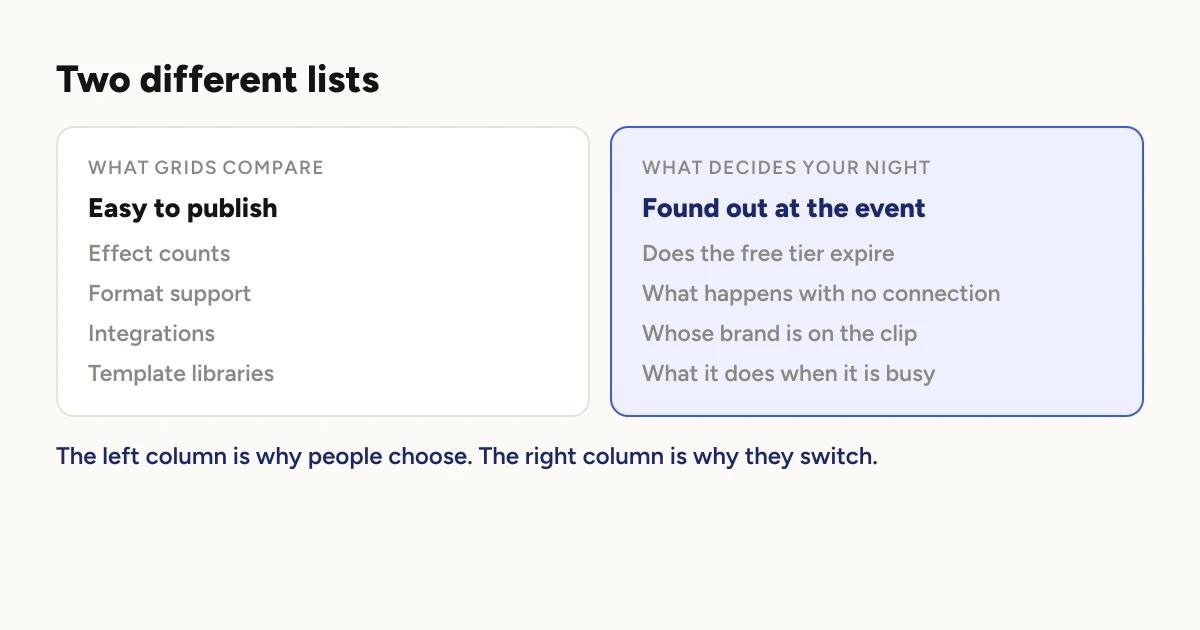
Most people choose booth software by comparing feature lists, because that is
what the marketing gives them. Then they run an event and discover that none
of the things they compared were the things that mattered.
This names no products. It is the list of questions worth asking about any of
them, including ours, and what a good answer sounds like.
1. Is the free tier a trial, or is it free?
These are very different and the marketing word is the same.
A trial gives you the whole product for a short time, then stops. A genuinely
free tier gives you a limited product forever. Both are legitimate. What you
cannot do is plan around the wrong one.
What to check: does the free tier expire, and does it cap the number of
events. A cap on events is the one that hurts, because it arrives exactly
when the business starts working.
Free 360 photo booth apps covers what else a
free tier can quietly take away.
A good answer tells you plainly what is limited and what is not, without
you having to read a pricing table twice.
2. What actually happens when the venue has no usable connection?
Ask this specifically, and be suspicious of a vague answer, because "it
queues up and sends later" is not a plan.
The distinction that matters: can guests get their clips at the event
with no internet at all, or do they just receive them eventually.
What to check: whether the app can deliver over a local network with no
route to the internet, and what happens to guest contact collection when it
cannot reach anything. Those two have different answers, and the second is
usually no.
A good answer distinguishes the video from the data, because they behave
differently and a vendor who blurs them has not thought about it.
3. Whose brand is on the clip?
The clip a guest posts is the most valuable advertising you will get, and it
only works for you if it carries your name.
Every app answers this somehow. Some watermark free output, some charge for
custom branding, some include it. None of those are wrong, but you need to
know which one you are buying, because a booth whose clips advertise the
software company is doing marketing for the wrong business.
What to check: on the plan you intend to actually pay for, can you put
your own logo, your own overlay artwork, and no one else's mark on the video.
4. Can you run a real event before paying?
Not a demo. A real event, with real guests, on your rig, in a venue.
Setup screens tell you nothing about how software behaves at 11pm with a
queue. If you cannot test that before committing, you are buying on faith.
A good answer is yes, without a card.
5. What hardware does it need, and do you already own it?
Here the honest answer for us is narrow, so it is worth stating plainly:
some apps run on far more hardware than others.
If you shoot with a GoPro or a DSLR, run mirror booths as well, or need a
Windows machine in the loop, that requirement should decide your choice
before anything else on this list. Breadth of hardware support is a real
advantage and the apps that have it earned it.
If you are running a phone on a 360 platform and nothing else, this criterion
costs you nothing, and you can weigh the rest of the list instead.
6. What does the booth do when it is busy?
The question nobody asks and everybody discovers.
Rendering is the heaviest thing the phone does all night, and it happens
while the camera is recording the next guest. How an app handles that decides
your throughput far more than anything on a feature grid.
What to check: how many clips process at once, whether delivery shares
that budget, and what a second device actually adds.
Why your queue backs up covers
what that looks like in practice.
7. How do guests actually receive the clip?
At the booth by QR or AirDrop, by text or email, or from a separate station
away from the platform.
The separate station matters more than it sounds. If guests collect their
clip while standing on the platform, the platform is not available to the
next group, and your queue is now a delivery queue.
8. Can you get everything out afterwards?
Two exports, and they are different.
The clips, as a complete set, for the client who booked you. The
contact details, as a spreadsheet, for you.
What to check: both are available without a support request, and in a
format you can hand to a client or import somewhere.
Also ask where the only copy lives if you deliver locally, because on some
setups a locally delivered clip is not backed up anywhere until you upload it
yourself.
9. Effects: how many, or which ones?
The number is the easiest thing to advertise and the least useful thing to
compare.
In practice most operators settle on two or three looks and use them all
season, because a recognisable style is worth more than variety. A library of
sixty is not six times better than a library of ten if you are going to use
three.
What to check instead: can you preview an effect on your own footage
before an event rather than on a stock demo, and can you build or adjust one
if none fit.
A good answer lets you see the effect applied to a take you shot
yourself. That tells you more in thirty seconds than a grid of names.
The order these actually matter in
If you already own hardware that needs supporting, question 5 decides
everything and the rest is detail.
If you are running a phone on a platform, the ones that will affect you most
are 2, 3 and 6: what happens with no connection, whose brand is on the clip,
and what the booth does under load. Those three are the ones you find out
about at an event rather than on a website.
For what it is worth, ours is free to run a real event on, so question 4 is
cheap to answer for us. What Pro changes
answers question 3, and offline mode answers
question 2.
To see these questions applied to named apps, with prices, see
the best 360 photo booth apps.
Keep reading
How many clips does a 360 booth event produce?
A rough guide from Logibooth's own numbers. A typical event records a few dozen clips, and the busiest run into the hundreds. Here is what moves it.
Read more →
Choosing a 360 photo booth overlay template
Picking a template is quick. Picking one whose words still read on a spinning clip, and still show once a guest posts it, takes a little more thought. Here is what to look for.
Read more →
Running a 360 booth outdoors
Every indoor problem is about too little light. Outdoors the problem flips. The sun is one enormous light you cannot move, and part of every spin points straight at it.
Read more →