
Running two 360 booths at one event
Most of what you set up lives on the event, and every booth inherits it. A few things live on each booth. Knowing which is which is most of what a second booth asks of you.
A second booth is usually a sign that something is going right. Bigger events,
longer queues, or a client who wants coverage in two rooms.
It is also where operators get caught out, because a second booth is not just a
second copy of the first. Some things are shared between them and some things
are not, and the difference only shows up when a clip comes out wrong.
When is a second booth worth it?
Three situations, and they want different setups.
The queue is too long for one. Big guest list, short window, everyone
arriving at once. Two identical booths side by side, sharing everything.
Two rooms, or two areas. A reception and a terrace, or a main hall and a
quieter lounge. Guests in each area should see their own clips.
Two jobs at one event. A corporate event with two sponsors, or a wedding
that wants a portrait booth for posting and a landscape one for the screen.
Here the booths deliberately differ.
Working out which of these you are in, before you arrive, decides almost every
setting below.
What is shared, and what belongs to each booth?
This is the model worth holding in your head, because the app follows it
consistently.
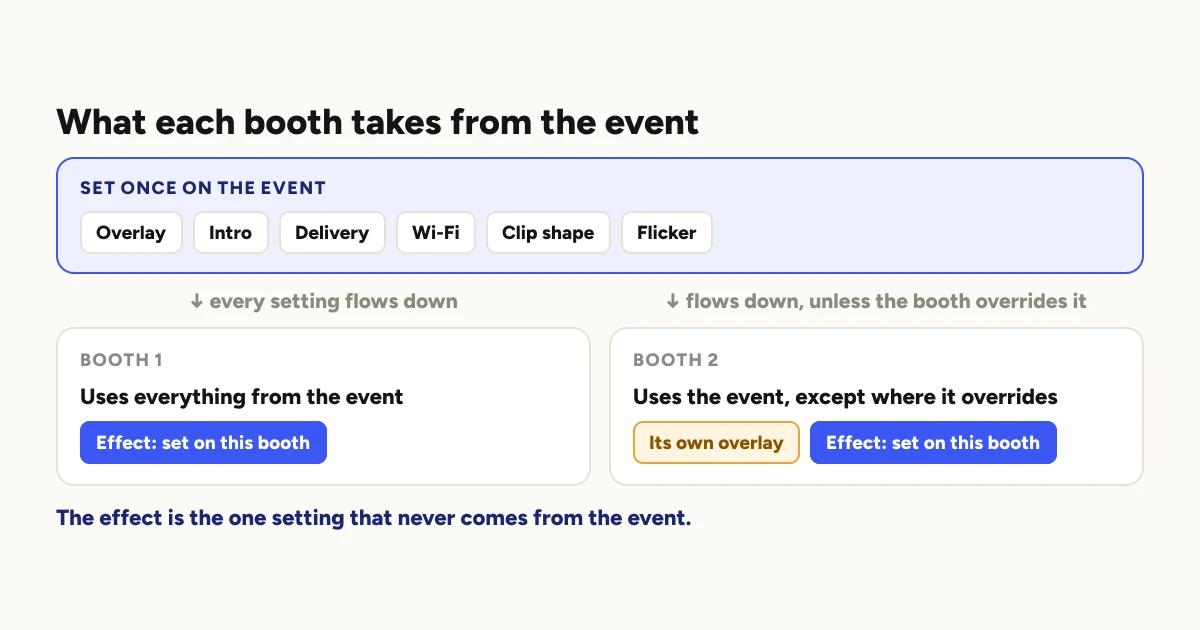
Almost everything is set on the event, and every booth inherits it. The
overlay, the intro, how clips are delivered, the Wi-Fi network, the clip shape
and flicker correction all work this way. Set them once and both booths use
them. A booth that is inheriting shows the setting marked as the default.
Any booth can override the event. Give a booth its own overlay, its own
intro, its own clip shape or its own delivery settings, and that booth uses its
own while the other keeps the event's. This is how one event serves two
sponsors: one overlay on the event, a different one on the second booth. It is
also how one event runs a portrait booth for posting and a landscape booth for
the screen.
The effect is the exception. It is set on each booth, never on the event,
so every booth needs its effect chosen separately. It is the one setting a
second booth will not pick up from anywhere.
Once you see it that way, most two-booth mistakes turn out to be the same
mistake: expecting a change on the event to reach a booth that has its own
setting, or expecting a change on one booth to reach the other.
Should both booths run the same effect?
Usually yes, and it is worth being deliberate about it.
If both booths are there to handle one long queue, guests will compare clips.
Two groups at the same party getting noticeably different styles reads as a
mistake rather than variety.
If the booths are doing different jobs, different effects are fine and often
right. The rule of thumb is simple: if a guest could use either booth, match
them. If each booth has its own audience, they can differ.
How should the Share Station work with two booths?
It can show every booth or just one, and the right choice depends on the
layout.
All booths pools everything from the night. That suits two booths side by
side, where guests do not care which one filmed them.
A single booth shows only what that one recorded. That suits two booths in
different rooms, where a guest in the lounge should not be scrolling past clips
from the main hall to find their own.
If you have two areas, it is usually worth a station in each, each set to its
own booth.
What do two booths do to the queue and the wifi?
Each phone renders its own clips, so a second booth genuinely doubles how much
you can process. It does not help a connection that is already struggling.
Both booths upload through the same venue network unless you give one its own.
If the wifi was barely coping with one booth, two will make delivery slower,
not faster.
Why your queue backs up explains why
the upload decides the pace, and
running a booth with no wifi covers
what to decide in advance if the answer is that there is no usable connection
at all.
Does a second booth cost more to run in the app?
Not in Logibooth. Events, booths and clips are unlimited on every plan,
including the free one. A two booth event costs the same as a one booth event.
What a second booth does cost is everything around it: a second rig, a second
dedicated phone, a second light, and usually a second person. That is where
the real price of a second booth lives, and it belongs in your quote.
What to charge covers building that in.
A short checklist for the day
Decide which of the three situations you are in before setting anything.
Set shared things on the event, then check each booth for its own
overrides, because a booth with its own setting ignores the event's.
Choose the effect on each booth, since it is the one setting that never
comes from the event.
Record a test take on both booths and watch both back. A setting you
changed on the wrong booth looks fine in the room and wrong in the clip.
Point each Share Station at the right booth, or at all of them.
Keep reading
Running a 360 booth outdoors
Every indoor problem is about too little light. Outdoors the problem flips. The sun is one enormous light you cannot move, and part of every spin points straight at it.
Read more →
A 360 booth at a school formal or prom
Some of the guests are minors, which changes who your client is, which guest requests belong at the booth, and what the school needs to know about where the clips go.
Read more →
What is a 360 video booth?
Two names, mostly one product. A 360 video booth and a 360 photo booth are usually the same machine, but a plain video booth is something else entirely. Here is how to tell what you are looking at.
Read more →