
What a 360 photo booth actually costs
There is no single price, and anyone quoting you an average is guessing. Here is the real cost structure, including the parts most buying guides leave out.
Most articles answering this question open with an average price. Ignore
them. The spread between the cheapest working 360 booth and an expensive one
is wide enough that an average tells you nothing, and the number you actually
care about is not the platform anyway.
The short answer: the spinning platform is the cheapest interesting part of
the decision. What determines whether your videos look good, and whether
the business works, sits mostly outside it.
Here is the honest structure of the cost, and what published listings looked
like when this was written.
What does the platform itself cost?
Checked in August 2026, across seller listings and rental company price pages
in the United States, the picture looked like this.
Buying a platform. Listings ranged from a few hundred dollars for small
imported units to several thousand for larger motorised ones with cases and
lighting included. Most of what is marketed at working operators sits in the
middle of that range rather than at either end.
Renting one out. Rental companies published hourly rates, with packages
commonly quoted per event rather than per hour.
Two caveats worth more than the numbers. Those are United States dollars
from United States sellers, and freight plus import duty moves them a long
way in other markets. And a listed price is a listed price. It is not what a
booth is worth, and it is not what you will actually pay after shipping.
Do not build a business plan on a range you read in an article, including
this one. Get real quotes, in your currency, delivered to your address.
The part buyers get wrong
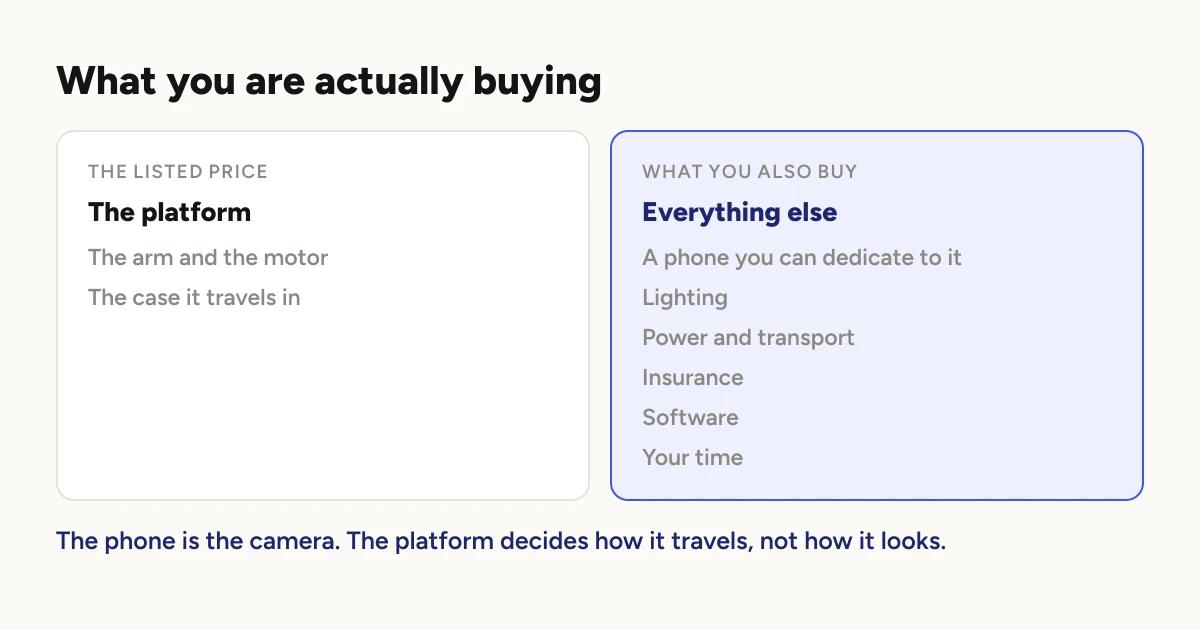
The phone is the camera. Not the platform. Which phone, and what to look
for in one, is covered in
choosing the phone that runs your booth.
The platform's job is to move an arm around at a steady speed and not wobble.
That is a mechanical problem, and past a certain build quality, a more
expensive platform does not produce a better looking video. It produces a
quieter, sturdier, better packed one, which matters for your back and your
transport costs but not for your footage.
The image comes from the phone, and the look comes from the software running
on it. A mid range platform with a recent phone will out-shoot an expensive
platform with an old one every time.
This is worth internalising before you spend, because the marketing in this
category is all about the platform. That is the thing sellers have to sell.
What costs do not appear in the listing?
This is the part most buying guides skip, and it is where first-time
operators get caught.
A phone you can dedicate to it. Not your personal phone. It needs to sit
in a bracket all night with the screen on, and it will be recording and
rendering at the same time. Storage matters more than you expect, because
clips accumulate fast and the raw footage is larger than the finished video.
Freeing space mid-event is not a thing you want to be doing, and there is
a guide for when you have to.
Power. A long event with the screen held awake needs mains power at the
booth, not a hopeful power bank.
Lighting. The single biggest quality upgrade available, and the one most
often left until later. A 360 booth in a dim reception with no dedicated
light produces dark, noisy footage no matter what you spent on the platform.
How to light a 360 booth covers what to buy
and where to put it.
Transport. Cases, a trolley, and a vehicle it fits in. This is a real,
recurring cost, and platform weight is worth checking before you buy rather
than after.
Insurance. Many venues will ask for public liability cover before they
let you set up. Check what your local venues require, because discovering
this the week of an event is a bad time to discover it.
A backdrop, props, and a stanchion or two if you want the queue to behave.
Your time. Setup, pack down, travel, and rendering are all unpaid unless
you priced them in.
What does the software cost?
The app that runs the booth is a separate decision from the platform, and the
pricing models across the category differ a lot. Some are subscriptions, some
are one-off, some are per event.
The main 360 booth apps, compared sets their
prices side by side, each in the currency it publishes.
For Logibooth specifically: the app is free, and the free tier is not a
trial. Unlimited events, all nine effects, the three guest requests, CSV
export, the Share Station and offline delivery are all free.
Pro changes exactly one thing: whose brand is on the clips. Free clips
carry a Logibooth watermark and leave your logo and overlay artwork off. Pro
clips carry yours instead. That is the entire difference, and
what Pro changes spells it out
row by row. Current pricing is on the pricing page.

The reason to mention the model rather than just the number: for a new
operator, the software can be a per-event cost rather than a fixed one. You
can run a free event to test your setup and only pay in the week you are
actually booked.
What does it cost to run, per event?
Once you own everything, each event still costs you:
- Fuel or freight to the venue and back
- Parking, which at city venues is not trivial
- Consumables if you offer props
- Data, if you are delivering clips over a mobile hotspot rather than venue
wifi - Replacement and repair, amortised, because things break
That last one is the item new operators forget entirely. Platforms have
moving parts, cases get dropped, and phones get sticky drinks spilled on
them.
The question underneath the question
Most people asking what a 360 booth costs are really asking whether it pays
back. That is a different article, and it depends on your market, but the
cost side of it is simpler than it looks:
Your recoverable costs are mostly fixed and mostly upfront. Your per event
costs are small. That means the arithmetic is driven almost entirely by how
many events you book, not by how much you spent on the platform.
Which is another way of saying that spending more on the platform is rarely
the lever that matters. Spending on lighting, on a phone that can keep up,
and on whatever gets you booked more is.
Before you buy
Get quotes delivered, in your currency. Not listed prices.
Check the weight and the case, because you are the one carrying it.
Ask what phone mount it takes and whether your phone fits with its case
on.
Test the software before you commit to hardware. The software is the part
you interact with all night, and it is usually the cheaper thing to change
your mind about. Most apps in this category, Logibooth included, let you try
a real event without paying.
Do not buy lighting last. It is the upgrade that changes the footage
most, and it is the one that gets deferred most.
Related reading
If you are still working out what the thing actually does, start with
how a 360 photo booth works. If you
have already bought one and are planning your first event, the practical
constraint to understand early is
why your queue backs up, because
it decides how many guests you can actually get through in an hour.
A note on the numbers in this article: the ranges above describe what sellers
and rental companies were publishing in August 2026, in United States
dollars. They are a snapshot of listings, not an industry average, and they
are not a substitute for a quote. Nothing here is invented, and where a
figure would have been a guess, it has been left out.
Keep reading
How many clips does a 360 booth event produce?
A rough guide from Logibooth's own numbers. A typical event records a few dozen clips, and the busiest run into the hundreds. Here is what moves it.
Read more →
Choosing a 360 photo booth overlay template
Picking a template is quick. Picking one whose words still read on a spinning clip, and still show once a guest posts it, takes a little more thought. Here is what to look for.
Read more →
Running a 360 booth outdoors
Every indoor problem is about too little light. Outdoors the problem flips. The sun is one enormous light you cannot move, and part of every spin points straight at it.
Read more →