
What goes wrong at a 360 booth, and how to fix it
Search for help with a 360 booth and you mostly get results about Apple's Mac Photo Booth app. This is the operator version, organised by what you can actually see.
Almost nobody has written real troubleshooting for this format. Search for it
and you get results about Apple's Mac Photo Booth app, which is a different
product entirely.
So here is the operator version, organised the way you actually arrive at it.
You do not know what is wrong. You know what you can see. Find the symptom
below and it will tell you what is behind it.
Why is the clip dark, grainy or soft?
Almost always light, and almost never the phone.
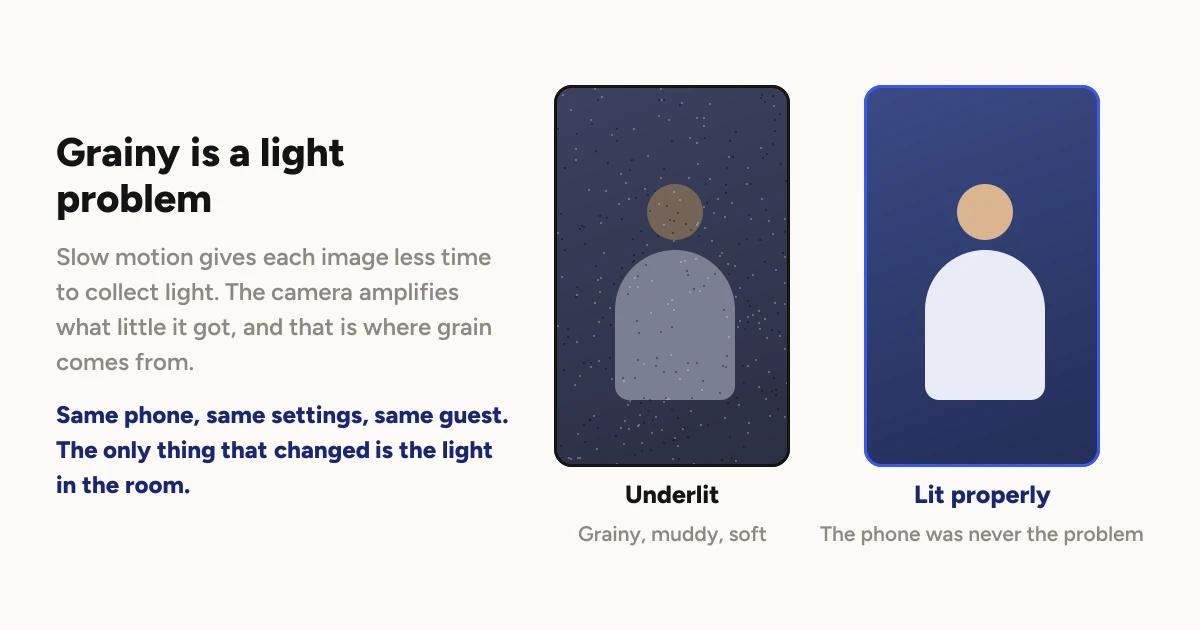
Slow motion captures many more images every second, and each one gets a shorter
slice of time to collect light. The camera compensates by amplifying what it
got, and amplification is where grain comes from. A room that looked fine to
you can be nowhere near enough for the camera.
This is the most common quality complaint and the cheapest to fix.
Lighting a 360 booth has the detail, and the
short version is that your light needs to travel with the camera or wrap evenly
enough that direction stops mattering.
If the clip is soft rather than dark, check the lens. An hour of guests leaning
in leaves fingerprints, and nobody ever checks.
Why are there dark bands rolling through the clip?
That is mains flicker, and it has one cause and one fix.
Venue lights cycle with the mains supply, faster than your eye can follow. If
the camera is not in step with that cycle, each image catches the light at a
different point in it, and the difference shows up as bands moving through the
picture.
The fix is a setting: Flicker correction, in the booth's Settings tab, matched
to the mains frequency of the country you are working in. It defaults to 50 Hz,
so a North American booth needs it changed once.
The full explanation is here.
Why did a clip fail, and is the video gone?
Usually not gone. Failed means the last attempt errored, not that the
recording was lost.
The quickest thing to try is closing the app fully and reopening it. On each
launch it takes one pass at clips left in failed and retries them. If whatever
caused the failure has since gone away, that pass fixes them without you doing
anything.
The fact that catches people out is that retry only works on the device that
recorded the clip.
Why a 360 clip failed covers the states, what
each one means, and the one case that genuinely is unrecoverable.
Why is the booth getting slower as the night goes on?
Two different causes, and they feel the same from the outside.
The queue. The phone renders two clips at a time, and a slot is not free
when rendering finishes, it is free when the upload finishes. So a slow
connection backs up rendering, not just delivery.
Why your queue backs up explains it
properly, including what a second device does and does not fix.
The phone getting hot. This one has no article of its own, so here it is.
A booth phone films, renders and uploads continuously for hours. That is a
sustained load, and phones slow themselves down when they get hot to protect
the hardware. It is not a fault and no software setting turns it off. Logibooth
does not manage device temperature and no booth app can.
What actually helps:
Take the case off. The single most effective thing, and the one nobody
does. A case is insulation.
Keep it out of direct light. Both sunlight and a hot lamp aimed at the arm.
Give it air. A phone pressed flat against a mount with no airflow runs
hotter than one with a gap.
Charge it with a slower adapter if you can. Fast charging generates heat of
its own, and you are running all night rather than topping up quickly.
If a phone is hot enough to throttle regularly, the real answer is a dedicated
phone with headroom rather than a workaround.
Choosing the phone that runs your booth
covers what to look for, and sustained performance matters more than peak
speed for exactly this reason.
Why did storage fill up mid-event?
Because clips are large and they do not leave the phone until they have
uploaded.
The trap is that clearing space looks like the obvious fix and can be the
worst possible move. A clip that has not finished uploading exists only on
that phone. Clearing storage before the upload completes loses it
permanently. Not failed, not recoverable. Gone.
So the order matters: confirm the uploads have finished, then clear. On an
event with no usable connection that may mean waiting until you are somewhere
with wifi, which is covered in
running a booth with no wifi.
The prevention is dull and it works. Start every event with the phone empty,
and check storage during the quiet part of the night rather than during the
rush.
Why did the battery not last?
Because the phone is doing three demanding jobs at once for hours, and no
phone battery is sized for that.
Plan to run on power rather than hoping. Treat the cable and the adapter as
booth equipment that you pack and check, not as an afterthought you borrow from
the venue. A booth that dies at the peak of the night is almost always a booth
that was running on battery because the cable was in the other bag.
A working order when something is wrong live
You are standing at a booth with a queue. This is the order that solves the
most for the least disruption.
Look at the clip, not the app. What you can see tells you which half of
this article you are in. Quality problems are light. Delivery problems are
connection and storage.
Close the app fully and reopen it. Cheap, fast, and it triggers the retry
pass on failed clips.
Check storage before you touch anything else. It is the one problem where
the obvious fix causes permanent loss.
Keep the queue moving even if clips are backing up. Guests care about
having a turn. Recording is fast, and rendering can catch up after they have
walked away.
Write down what happened. Whatever caused it will happen again, and by next
Saturday you will not remember the detail.
What prevents most of this
Almost everything above is decided before guests arrive.
Record one real test take when you get there and watch the whole thing back.
Not a preview, a full take with the effect you plan to run. That single habit
catches lighting, flicker, framing and storage in the one window where you can
still do something about them.
Then check your storage, plug in your power, and take the case off the phone.
Keep reading

How many clips does a 360 booth event produce?
A rough guide from Logibooth's own numbers. A typical event records a few dozen clips, and the busiest run into the hundreds. Here is what moves it.
Read more →
Choosing a 360 photo booth overlay template
Picking a template is quick. Picking one whose words still read on a spinning clip, and still show once a guest posts it, takes a little more thought. Here is what to look for.
Read more →
Running a 360 booth outdoors
Every indoor problem is about too little light. Outdoors the problem flips. The sun is one enormous light you cannot move, and part of every spin points straight at it.
Read more →